Using Invoice Grouping Keys to Break Down Usage on Invoices
Last updated: May 11, 2025
Invoice grouping keys allow you to break down usage and costs on invoices by specific properties from your events, such as user ID, project name, or region. This helps provide transparency to customers about how costs are distributed across different dimensions.
Requirements for Using Invoice Grouping Keys
To use invoice grouping keys, two conditions must be met:
The billable metric must be decomposable - meaning the metric calculation can be broken down into smaller time periods and summed up to get the total. Simple SUM and COUNT operations are typically decomposable, while COUNT DISTINCT and MAX operations are not.
The event property you want to group by must be available in your event data.
Setting Up Invoice Grouping
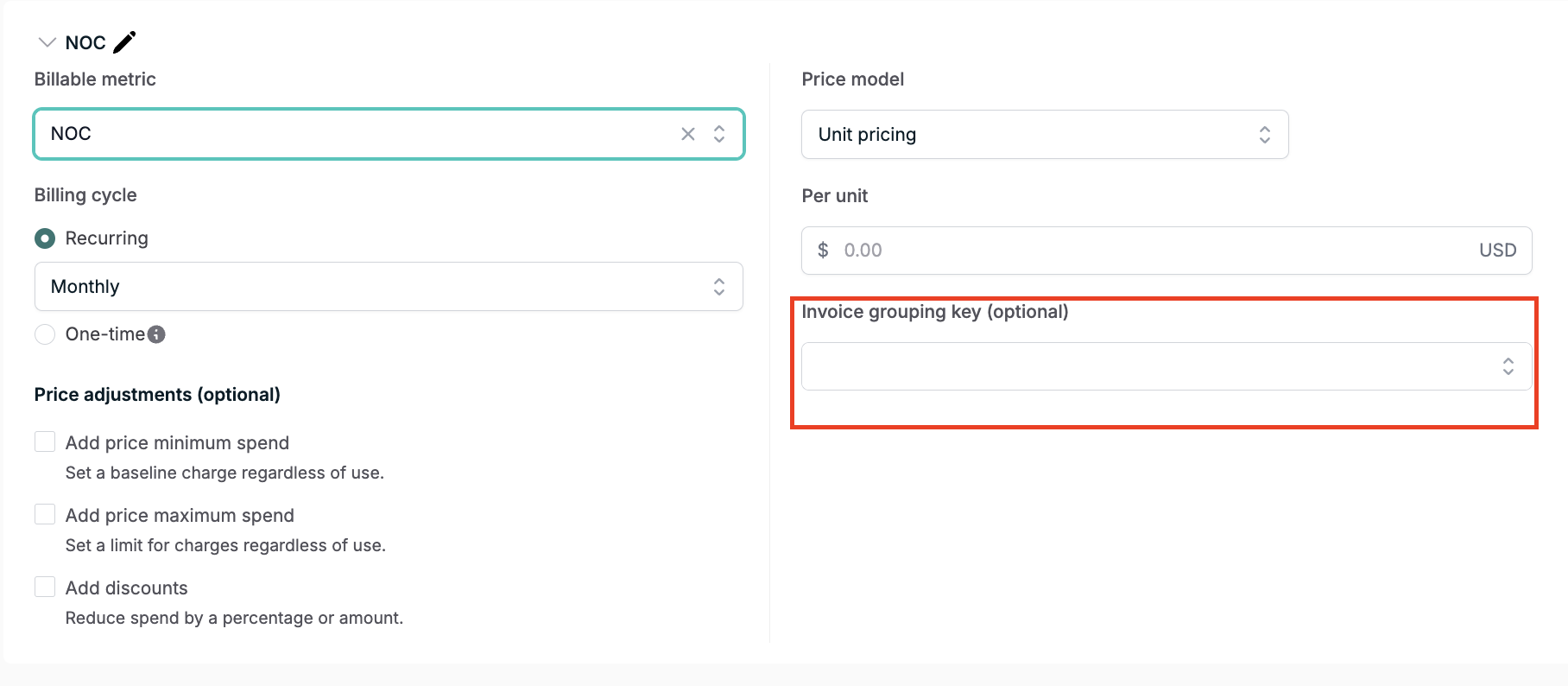
When creating or editing a price in a plan, you'll see an optional "Invoice grouping key" field if your metric is decomposable. Select the event property you want to group by from the dropdown.
Limitations
Only one grouping key can be specified per price
Invoice grouping keys cannot be used with package pricing models
Changes to grouping keys require creating a new plan version and migrating subscriptions
Example Invoice Output
When invoice grouping is enabled, the invoice will show subtotals for each unique value of the grouping key. For example, if grouping by region, you might see:
API Usage
├── US-East: 1,000 calls ($10.00)
├── US-West: 2,000 calls ($20.00)
└── EU: 500 calls ($5.00)
Total: 3,500 calls ($35.00)
Tip: Choose grouping keys that will remain stable over time. Using mutable properties like names instead of IDs could lead to split line items if values change mid-billing period.