How to void an invoice
Last updated: February 6, 2025
You can void issued invoices both in the Orb portal and via the API. Note that draft invoices cannot be voided - you'll need to issue them first before voiding.
What happens when an invoice is voided?
When you void an invoice:
The invoice cannot be used for payment
Any future payment attempts on the invoice will be cancelled
The invoice remains in your records but is clearly marked as void
Steps to void an invoice
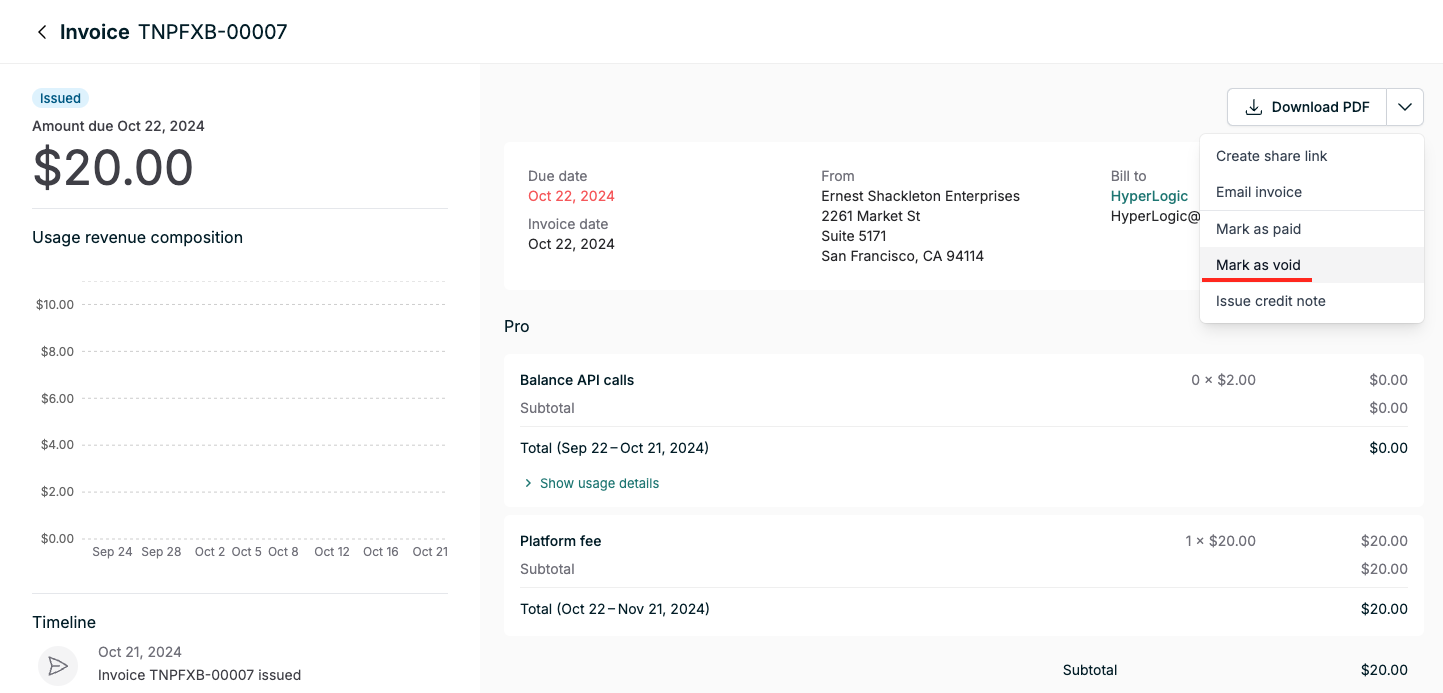
Navigate to the invoice details page
In the dropdown next to "Download PDF", look for the "Mark as void" option
Click to void the invoice
Important: If you have auto-emailing enabled and need to void a draft invoice, be aware that issuing the invoice (required before voiding) may trigger an automatic email to the customer. Consider disabling auto-email temporarily if needed.
To void an invoice via the API, follow the schema for the Void invoice API endpoint.