Troubleshooting QuickBooks Online (QBO) Sync Issues
Last updated: September 13, 2024
If you're experiencing sync issues between Orb and QuickBooks Online (QBO), follow these steps to troubleshoot and resolve common problems:
Checking sync errors
In the Accounting tab, you can click the link to view all records that have failed to sync to QBO
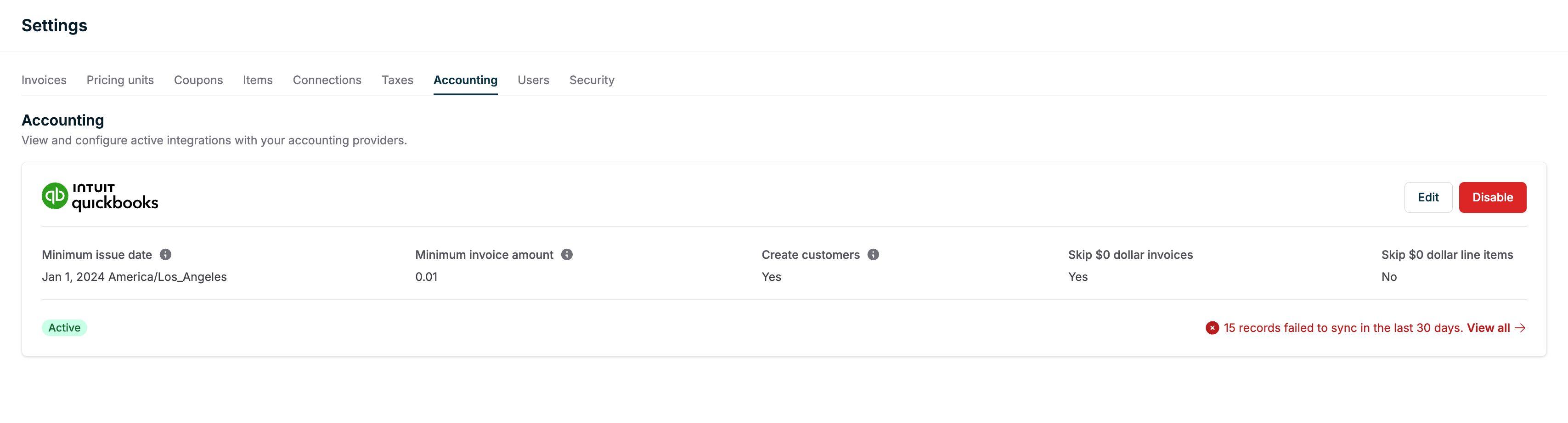
When an invoice or customer fails to sync, you can view the specific error message:
Look for a "Failed" label next to the record that failed to sync
Hover your cursor over the "Failed" label to view the error message returned by QBO
Common sync issues and solutions
1. Duplicate customer names
If a customer already exists in QBO with the same name, you may encounter sync issues. To resolve this:
Go to the customer page in Orb
Check if the existing QBO customer name is already selected
If it is selected but still not syncing, contact Orb support for further assistance

2. Unmapped items
Ensure that all items in your Orb are linked to products in QBO. The sync may fail if all items on the invoice are not mapped to products in Orb.
Verifying successful syncs
Sometimes, a customer sync fails because the customer record is already in QBO. In this case, invoices may still sync successfully. To check:
Review the sync logs in Orb
Look for successful invoice syncs even if the customer sync shows as failed

Manual sync options
If automatic syncing fails, you may need to manually push data to QBO. Contact Orb support for guidance on manual sync procedures, as these may vary depending on your specific setup and permissions.
Still having issues?
If you've tried these steps and are still experiencing sync problems, please contact Orb support with the following information:
Specific invoice or customer IDs that are not syncing
Screenshots of any error messages
Details of any troubleshooting steps you've already taken